

 Set up docs MCP
ClickPipes supports integrating with a schema registry to decode Avro- and Protobuf-encoded record values and structured Kafka keys.
Supported registries for Kafka ClickPipes
Kafka ClickPipes supports two families of schema registry:
- Confluent-compatible registries: any registry that is API-compatible with the Confluent Schema Registry, such as the Confluent Schema Registry itself and the Redpanda Schema Registry. Supports Avro and Protobuf.
- AWS Glue Schema Registry: for Avro data serialized with the AWS Glue SerDe, typically from Amazon MSK.
ClickPipes doesn’t support Azure Schema Registry yet. If you require support for it, reach out to our team.
Confluent-compatible registries
Configuration
To integrate with a schema registry during ClickPipes configuration, you must use one of the following approaches:
- Provide a complete path to the schema subject (e.g.
https://registry.example.com/subjects/events)- Optionally, a specific version can be referenced by appending
/versions/[version]to the URL (otherwise ClickPipes will retrieve the latest version).
- Optionally, a specific version can be referenced by appending
- Provide a complete path to the schema ID (e.g.
https://registry.example.com/schemas/ids/1000) - Provide the root schema registry URL (e.g.
https://registry.example.com)
Network connectivity
ClickPipes connects to the schema registry over HTTPS at the URL you provide. The schema registry does not need to be publicly accessible.
If your Kafka brokers are reached through a reverse private endpoint (AWS PrivateLink or GCP Private Service Connect), the schema registry can use the same private connectivity. ClickPipes resolves the registry hostname through the reverse private endpoint’s private DNS, so a registry hosted privately alongside your brokers is reachable as long as its hostname resolves to the reverse private endpoint’s private IP addresses (via the endpoint’s private DNS support or a custom private DNS mapping).
Keep the following in mind:
- The schema registry URL must use
https://. - If the registry hostname resolves to a private address, it must be reachable through a reverse private endpoint selected for the ClickPipe; otherwise the connectivity check during setup will fail.
How it works
ClickPipes dynamically retrieves and applies the schema from the configured schema registry.
- If there’s a schema ID embedded in the record value, it will use that to retrieve the schema.
- If there’s no schema ID embedded in the record value, it will use the schema ID or subject name specified in the ClickPipe configuration to retrieve the schema.
- If the record value is written without an embedded schema ID, and no schema ID or subject name is specified in the ClickPipe configuration, then the schema will not be retrieved and the message will be skipped with a
SOURCE_SCHEMA_ERRORlogged in the ClickPipes error table. - If the record value does not conform to the schema, then the message will be skipped with a
DATA_PARSING_ERRORlogged in the ClickPipes error table. - For Protobuf schemas only: ClickPipes will load any imported schemas defined as dependencies. Avro schemas with external references are not yet supported.
When mappings for fields such as _key.id are configured, ClickPipes resolves the schema ID embedded in the Kafka key independently from the record value. The key can use a different schema ID, but it must use the same registry family and serialization format as the value. Resolved key schemas are cached and schema changes are detected automatically.
AWS Glue Schema Registry
If your producers serialize Avro with the AWS Glue SerDe (for example AWSKafkaAvroSerializer against an Amazon MSK topic), ClickPipes can resolve those schemas directly from the AWS Glue Schema Registry. Glue uses a different wire format and a different API from Confluent-compatible registries, so it is configured separately.
AWS Glue Schema Registry configuration is currently available only through the ClickHouse Cloud console. It isn’t supported through the ClickPipes API or Terraform provider.
Configuration
In the ClickPipe creation wizard, enable Schema registry on the Kafka connection step and set Registry type to AWS Glue:
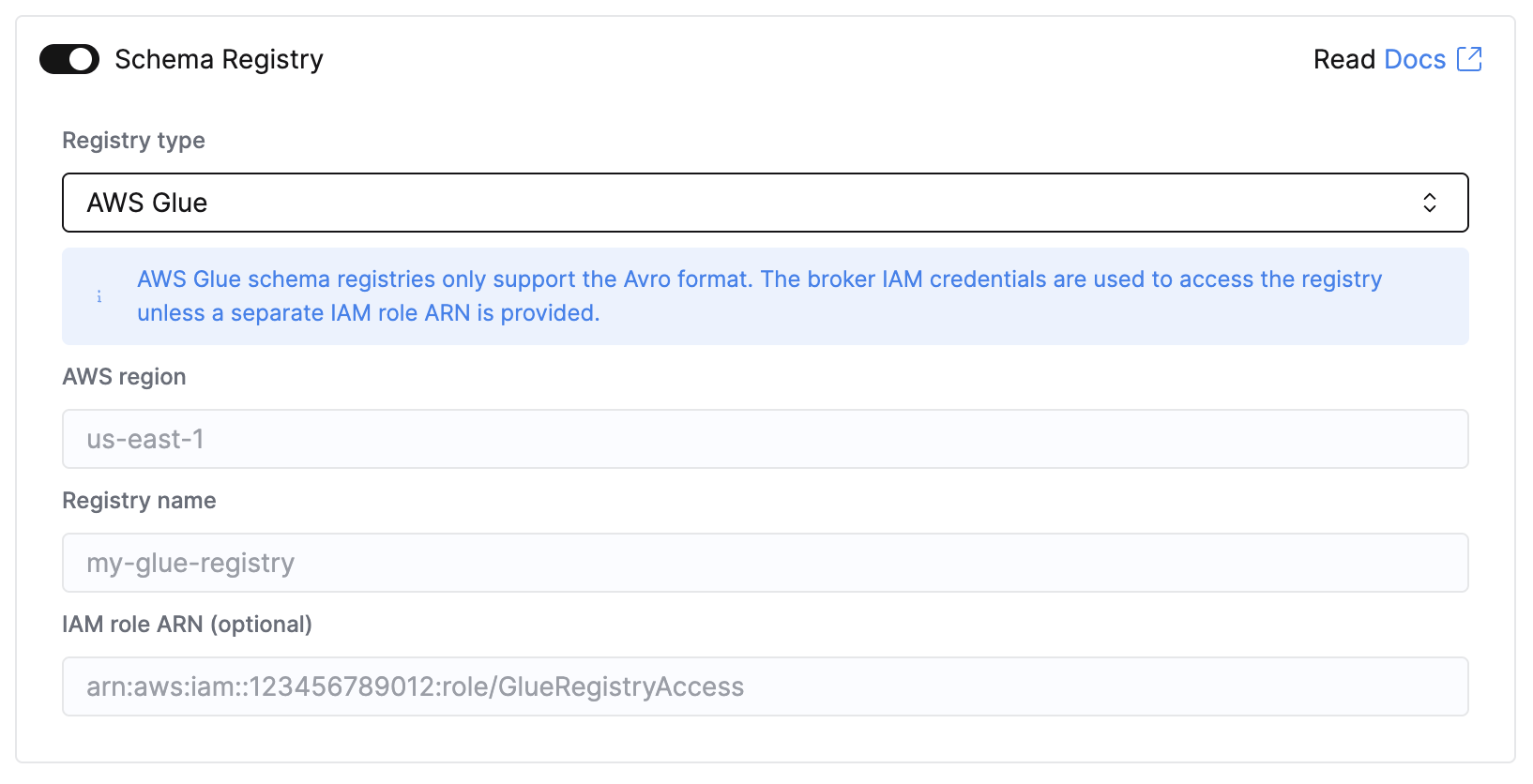
| Field | Required | Description | Example |
|---|---|---|---|
| Registry type | Yes | Select AWS Glue | AWS Glue |
| AWS region | Yes | Region the Glue registry lives in. Must match the registry’s region exactly. | us-east-1 |
| Registry name | Yes | Name of the Glue registry. Schemas that resolve to a different registry are rejected, so a typo surfaces when ClickPipes resolves a schema version. | my-glue-registry |
| IAM role ARN | Conditional | A dedicated role for registry access. Optional when your broker uses IAM authentication; required otherwise. | arn:aws:iam::123456789012:role/ClickHouseAccessRole-glue |
There is no registry URL to configure. Every record produced by the Glue SerDe carries the ID of its own schema version, which ClickPipes resolves with glue:GetSchemaVersion and caches, one API call per distinct schema version. Schema evolution is handled automatically: when records switch to a new schema version mid-stream, it is resolved on first sight.
IAM setup
Use whichever of the two options fits your setup. Option A is the common case for Amazon MSK.
Option A: reuse the broker’s IAM identity
If your Kafka ClickPipe already authenticates to MSK with IAM, ClickPipes uses the same IAM identity to read the registry. Leave the IAM role ARN field empty and add the following statement to the identity’s permissions:
- IAM role: Add the statement to the permissions policy for the role configured for MSK.
- IAM credentials: Add the statement to the permissions policy for the IAM principal associated with the access key.
{
  "Version": "2012-10-17",
  "Statement": [
    {
      "Sid": "ClickPipesGlueSchemaRegistryRead",
      "Effect": "Allow",
      "Action": ["glue:GetSchemaVersion"],
      "Resource": "*"
    }
  ]
}
For role-based authentication, no trust policy change is needed; the trust relationship configured for MSK already covers this access. IAM credentials do not use a role trust policy.
Option B: use a dedicated registry role
Use this when your broker does not authenticate with IAM (SASL/SCRAM, SASL/PLAIN, mTLS), or when the registry lives in a different AWS account from the broker.
Obtain the ClickHouse service IAM role ARN
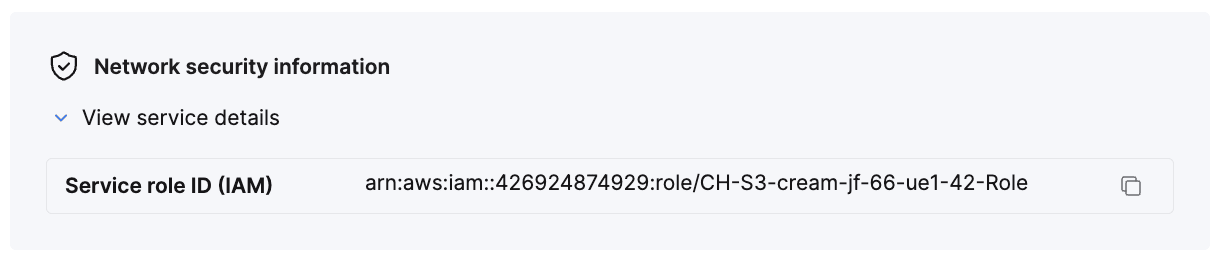
Open the service, select the Settings tab, scroll to the Network security information section, and copy the Service role ID (IAM) value, an ARN of the form arn:aws:iam::123456789012:role/CH-S3-example-service-Role. This is referred to below as {ClickHouse_IAM_ARN}. Every ClickHouse service deployed on AWS has its own role, so this value is different for each service.
Create the registry IAM role
Create an IAM role in your AWS account. The name of the role must start with ClickHouseAccessRole-.
Configure the trust policy
Replace {ClickHouse_IAM_ARN} with the value from the previous step.
{
  "Version": "2012-10-17",
  "Statement": [
    {
      "Effect": "Allow",
      "Principal": {
        "AWS": "{ClickHouse_IAM_ARN}"
      },
      "Action": "sts:AssumeRole"
    }
  ]
}
Configure the permission policy
{
  "Version": "2012-10-17",
  "Statement": [
    {
      "Sid": "ClickPipesGlueSchemaRegistryRead",
      "Effect": "Allow",
      "Action": ["glue:GetSchemaVersion"],
      "Resource": "*"
    }
  ]
}
Configure the ClickPipe
Paste the new role’s ARN into the IAM role ARN field in the wizard.
Troubleshooting
| Error | Cause and fix |
|---|---|
access denied retrieving schema version …: check the IAM role grants glue:GetSchemaVersion |
The IAM identity used for registry access is missing glue:GetSchemaVersion. For role-based access, the role’s trust policy might also not name your service’s role ID. Re-check the IAM setup above. |
… is not authorized to perform: sts:AssumeRole on resource: … |
The trust policy names the wrong principal. The error includes the exact role that attempted the assume. Use that value in the trust policy. |
schema version … not found in Glue schema registry |
The records reference a schema version that doesn’t exist in the configured account or region. Confirm AWS region matches the registry’s region. |
schema version … belongs to Glue registry "X", but the pipe is configured for registry "Y" |
Your producers register schemas in a different registry than the pipe names. Correct Registry name, or point the producers at the right registry. |
the AWS Glue schema registry only supports the Avro format |
Glue pipes are Avro-only. JSON and Protobuf via the Glue SerDe are not supported. |
Limitations
- Avro only. JSON Schema and Protobuf via the Glue SerDe are not supported.
- Kafka sources only. Kinesis ClickPipes cannot use a Glue registry.
Schema mapping
The following rules apply to both Confluent-compatible registries and the AWS Glue Schema Registry. They govern the mapping between the retrieved value schema and the ClickHouse destination table, and also apply to record or message fields mapped from structured keys with the _key. prefix:
- If the schema contains a field that is not included in the ClickHouse destination mapping, that field is ignored.
- If the schema is missing a field defined in the ClickHouse destination mapping, the ClickHouse column will be populated with a “zero” value, such as 0 or an empty string. Note that
DEFAULTexpressions are not supported. - If the schema field and the ClickHouse column are incompatible, inserts of that row/message will fail, and the failure will be recorded in the ClickPipes error table. Note that several implicit conversions are supported (e.g., between numeric types), but not all (e.g., an Avro record field cannot be inserted into an
Int32ClickHouse column).